Every premium and members-only resource for $9.99/month, as a no-commitment subscription. See the plans

PalateKit

Menu

Request a resource

Describe the resource you are missing in one sentence. We will email you when it is published.

0 / 280

Unlock PalateKit

Unlock everything

Plan

Paying means accepting our terms of sale.

Secure payment by Stripe. Receipts and invoices sent by email.

Welcome back

Sign in to install, download or save this resource. A free account is enough for free resources.

PalateKit Pick

Vertical educational infographic with map and facts v1.0.0

Use this resource to create an educational infographic on a geographic or scientific subject

New

  • 551 downloads
  • 239 likes
  • 138 saves

Free

Install with the CLI

In a terminal, from the folder you want:

npx --yes palatekit@latest install educational-infographic-poster

First time: connect the CLI with

npx --yes palatekit@latest login

The prompt details a six-zone layout: header, central map, data visualization, info box, fact section and conclusion. Change the subject and figures to get your own infographic. The sample covers Point Nemo.

Updated November 2, 2026

Navy vertical infographic on Point Nemo with a South Pacific map, distances and three fact columns.

Details

Generates with
GPT Image 2
Licence
CC-BY-4.0

Similar resources

View all

What you get

  • prompt.txt: the prompt (French translation in the French version), "topic" variable kept
  • A six-part layout plan
  • Style guidance: navy background, gold and white text, serif headings

Good fit for

  • Teaching card for a course or educational channel
  • Explainer visual for a blog or newsletter
  • Communication piece about a research result

Not for

  • Data that must be exact without proofreading
  • Large-scale technical reports

Tags

  • infographic
  • education
  • map
  • explainer
  • data

About

You say

"Use this prompt for the topic 'the Mariana Trench' with my figures."
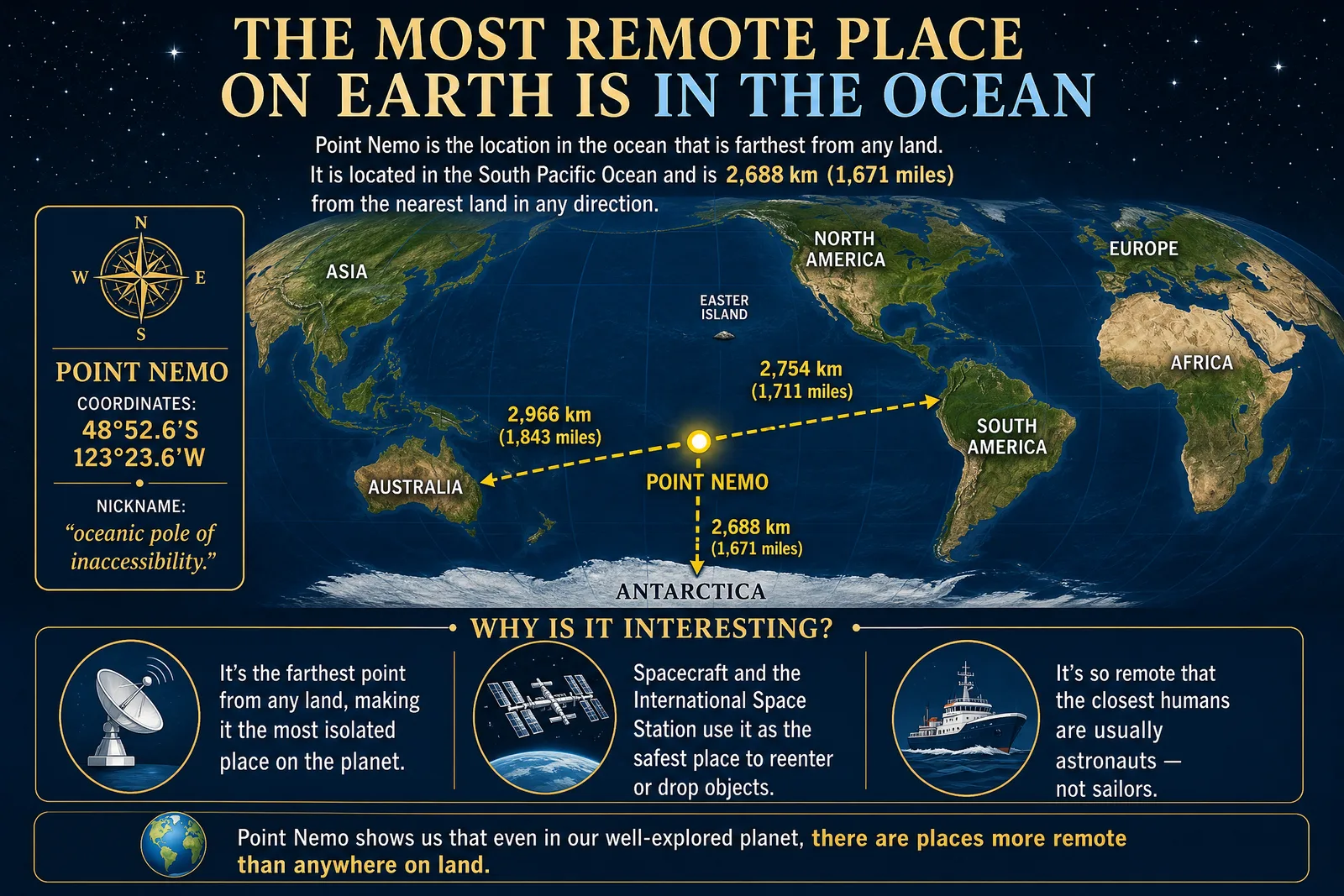
Navy vertical infographic on Point Nemo with a South Pacific map, distances and three fact columns.

Prompt published by Generated Atlas under the CC-BY-4.0 license, translated by PalateKit.

Show more

Prerequisites

You bring
A subject to explain and The figures and facts to display

How to use it

  1. Replace the subject and key figures in each zone.
  2. Paste the prompt into your image generation tool.
  3. Proofread every text and figure before publishing.

Content preview

Files

  • educational-infographic-poster.md2.2 KB
  • LICENSE1.4 KB
  • NOTICE-PALATEKIT.md0.5 KB

Origin and licence

Modified by PalateKit

Author
Generated Atlas
Source
github.com/YouMind-OpenLab/awesome-gpt-image-2/blob/f06c0dd7fdfd593473ebdd932316bc9718d9ec3f/README.md
Licence
CC-BY-4.0

Notice

Version modifiée de « Infographic / Edu Visual - Point Nemo Infographic » (Generated Atlas, CC-BY-4.0) : traduction française et fiche par PalateKit.

User reviews

–

No ratings yet

Loading reviews…

Delete your review?

Your rating and comment will be removed from the page.

Frequently asked questions

Are the figures reliable?

Image models make mistakes in text and numbers; check everything before publishing.

Can I change the colours?

Yes, edit the navy background and gold accents in the canvas description.